WHY ITSLEARNING
See why schools choose a European LMS designed for education over generic platforms.
See why schools choose a European LMS designed for education over generic platforms.
itslearning empowers teachers and helps all students reach their full potential.

Translation generated by an AI translation service
We publish release notes a few days before each mid-week update. If you are reading this, the update will be available soon. Please note that release dates may change. Some features are also released gradually, which means not all users will see them at the same time. If a feature you expected is not yet available, it will appear soon.
| Area | Reference | Summary |
|---|---|---|
| Task | ITS-98438 | Fixed an issue that prevented users from adding files in a Task. The issue occurred after 2025.5.4 release. |
We've removed the help link in Note, as it previously directed users to our outdated help system, WebHelp.
Moving forward, all help content will be available through our updated platform - Freshdesk - ensuring a more consistent and modern support experience.
| Area | Reference | Summary |
|---|---|---|
| Calendar | ITS-97411 | Under "Plans" in Calendar. Fixed a issue that prevented more than 100 users from showing in the drop down. |
| Parents | ITS-97884 | Fixed an issue where some new parent users where not able to login. |
We've updated all icons in Your Settings with a modern design that's clearer, more accessible, and visually consistent.
| Area | Reference | Summary |
|---|---|---|
| MsTeamsPlugin | ITS-97129 | Fixed an issue, where navigating from Teams integration to itslearning could give a spinning wheel. The issue happened after adding a course in itslearning through the Teams integration. |
| Participants Page | ITS-96023 | Fixed an issue on the view showing course applicants. The paging settings were not working correctly when there were less than 25 applicants. |
| Planner | ITS-97417 | Fixed an issue in Planner. When printing from the table view, the printout page was blank. |
| Area | Reference | Summary |
|---|---|---|
| IMS-ES | ITS-96648 | Updated IMS-ES web services to allow setting DigiDeliveryId without setting EckId. |
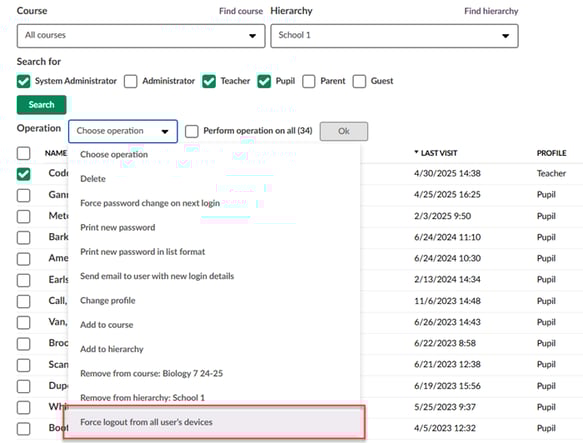
New operation 'Force logout from all devices' is now available in 'Users and access rights'. This allows you to terminate active sessions for selected users or all users across all devices, enhancing security and compliance.
Key Benefits
How to Use
If your site is uses external authentication (eLogin), user sessions need to be terminated also from the Identity Provider side.
Important: Users may lose unsaved work when logged out. Whenever possible, please communicate with them beforehand.
We've enhanced the planner tool to improve usability on smaller devices. The action bar in Play Plan mode is now always visible and accessible on screens narrower than 1024 pixels. This makes it easier for users to navigate between different plan elements, even when using tablets or smaller laptops.
In addition to improving usability, this release also resolves several related support issues reported by users regarding missing or inaccessible navigation controls on small screens.
To make it easier to find key pages, we've added several new options to the Global Search. You can now quickly access Your Settings, Edit Profile, Customize itslearning, and Connected Accounts directly from the search bar. All other search functionality remains the same, so you can continue to search for pages like Courses and Resources as you did before.
| Area | Reference | Summary |
|---|---|---|
| Participants Page | ITS-96019 | Fixed a bug on the course applicants list view. If a user in the list of applicants was deleted, it caused an issue with displaying the page of users where the user previously was showing. |