See why schools choose a European LMS designed for education over generic platforms.
AI built in. Data stays in.
Generate assignments, tests and more from a simple prompt. Built into itslearning and powered by EU-hosted AI.
AI tools, built into itslearning
The AI Toolkit brings AI directly into itslearning, so teachers can plan and create content without leaving the platform. No copying from external tools, no extra logins, and no school data leaving the EU. Simply describe what you need, add your own materials, and get an editable draft aligned to your curriculum, ready to differentiate and assign in a few clicks.
The AI Toolkit will soon be available as an optional add-on and is not part of the standard itslearning licence.
Why teachers use it
Save hours every week
Draft tests, assignments and worksheets in minutes. Teachers can save time on lesson preparation, especially for structured tasks.
Differentiate in one step
Generate basic, standard and advanced versions of the same task at the same time. Each come with a rubric attached and is ready to assign to the right students.
Built into your workflow
Content created with AI goes straight into your Plans or Resources, depending on where you start. No copy-paste. No tab-switching. No second tool to learn.
Your data stays in the EU
Powered by Azure OpenAI, hosted in Sweden. Content generated through itslearning is not stored or used to train AI models. Aligned with the EU AI Act.
What teachers can create
Assignment
Create instructions and structured tasks in minutes. Differentiation generates the assignment at basic, standard, and advanced level in one step, ready to assign to the right students.
Test Tool
Create a test with different question types in seconds. Language and difficulty match the age group set in your AI settings.
Worksheet
Bring different task types together on one worksheet, without starting from scratch. Choose which types to include and build exactly what your lesson needs.
Article
Create an article or explanatory text on any topic, saving you writing time. The article can be based on your own materials. Students can use the text for learning and exploration.
Session builder
Create the structure for a teaching session in one step. Set the duration, and the tool suggests a structure ready to use, typically including an introduction, activities, and a summary.
Glossary
Help students understand new or complex terms in moments. Choose how many entries you need. The glossary opens in a Page, ready for your students.
Inspire me
Get new teaching ideas whenever you need fresh inspiration. Suggestions open in a Page, ready for you to build on straight away.
How it compares
Most AI tools teachers use today route school content through third-party servers, store data outside the EU, and ask teachers to switch between platforms to get anything done.
External AI tools
Often outside the EU
Varies, often retained
Separate tool, copy-paste content back
Manual, one level at a time
Created separately
Generic and curriculum-agnostic
AI Toolkit
Azure OpenAI, hosted in Sweden
Not stored, not used for training
Built into Plans and Resources
Basic, Standard and Advanced versions generated in one step
Generated alongside the task
Aligned to your course, level and teaching materials
What the pilot told us
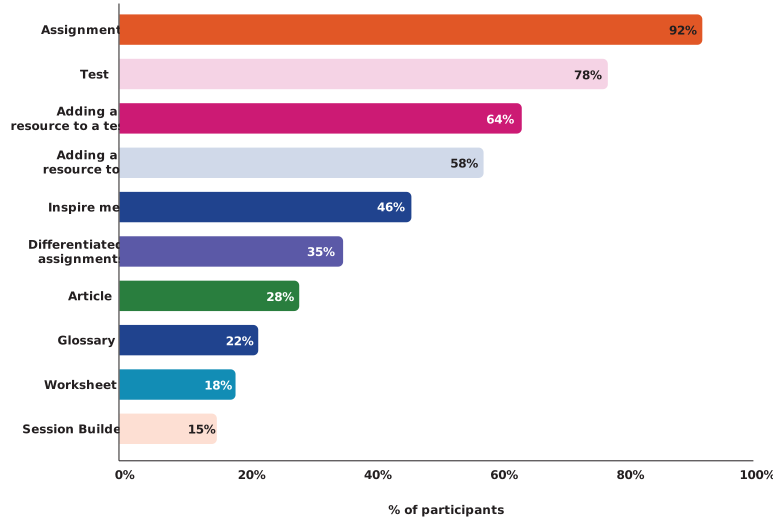
We ran the AI Toolkit pilot across seven countries in April 2026, with 112 teachers and administrators testing the tools over two weeks. Findings were consistent across markets.
Assignment and Test were the most-used tools. Teachers turned to them most often for drafting structured content like assessments and tasks.
Using your own materials made a difference. Teachers valued the ability to upload their own resources and have the output stay close to their curriculum, level and style.
Three-level differentiation stood out. Producing basic, standard and advanced versions of an assignment in one step helped teachers create more personalised content for their classes.
Workflow integration matters. Teachers said the toolkit works best because it lives inside itslearning. No copy-paste. No tab-switching. No second platform to learn.

AI Principles & GDPR
We want to support teachers and give them more time for what matters most: their students. We see what AI tools can offer here, and we take just as seriously our responsibility to safeguard your data.
Learn more about itslearning AI Principles and how we meet GDPR requirements across all of our services.
Frequently asked questions (FAQ)
The AI Toolkit is an add-on for itslearning customers. System administrators decide which teachers and schools have access.
No. The toolkit is designed for teachers and is only available to teacher accounts.
GPT-5.4 mini, accessed through Azure OpenAI in the EU.
Content generated through itslearning is not stored or retained, and is not used to train AI models.
Yes. Hosting is in Sweden, inside the EU, and processing follows our standard data protection terms.
The AI Toolkit is a paid add-on to your itslearning licence. The commercial model has two parts: a per-licence add-on fee, and a usage component that reflects the cost of running the AI service. Pricing varies by country and customer size, and final details will be shared closer to launch. During the free extended pilot, itslearning covers all AI usage costs.
The launch webinar on demand, hosted by Beathe Moe and Ole Solheim, with a demo. [Link to webinar recording]
The AI Toolkit uses Microsoft Azure OpenAI by default, hosted in the EU. The underlying architecture is designed to support additional AI providers over time, and we keep the provider landscape under review. If your school has specific requirements about AI provider choice, your itslearning representative can talk through what is currently possible.
When you upload your own teaching materials, the AI uses them to shape the output it generates for you. Your materials make the output more relevant to your curriculum, level and style. The content is processed in real time to produce a response, then discarded. It is not stored, retained, or used to train the AI model.
The AI Toolkit generates new content based on your prompt and your own materials. It does not reproduce or redistribute copyrighted text from external sources. When you upload your own resources to guide the AI, you remain responsible for ensuring you have the right to use them.