

WHY ITSLEARNING
See why schools choose a European LMS designed for education over generic platforms.
See why schools choose a European LMS designed for education over generic platforms.
itslearning empowers teachers and helps all students reach their full potential.

Translation generated by an AI translation service
We publish release notes a few days before each mid-week update. If you are reading this, the update will be available soon. Please note that release dates may change. Some features are also released gradually, which means not all users will see them at the same time. If a feature you expected is not yet available, it will appear soon.
Image content blocks in Page now make better use of the available space when they contain only one image.
Instead of displaying a single image using the gallery grid layout, the image is shown larger within the content block. Students and teachers can still select the image to open it in the full overlay carousel view.
| Area | Reference | Summary |
|---|---|---|
| Assessment record | ITS-102261 |
With an integrated LTI tool that can return a score, and using labels on the ranges of scores. Scores returned from the LTI may have gotten an incorrect label. This was fixed. |
| CKEditor | ITS-107005 |
Fixed an issue that made it not possible to select the whole folder when creating a tree-link from the editor. |
| Discussion | ITS-106973 |
The "breadcrumbs" navigation at the top of the page stopped displaying correctly for certain resource types in Resources. This was fixed. |
| Learning Path | ITS-104733 |
Made improvements to permissions in Learning path. Previously it was possible to in a rare case end up with a learning path that the teacher was not able to open correctly. |
| Planner | ITS-105157 |
From within a task that is added to a plan. From this view, it did not work to click on a student to navigate to their profile card. |
| SCORM player | ITS-106385 |
When importing a SCORM course. Added a feedback message to user if trying to import a course where there is a casing issue (meaning there are two files with the same name but different cases). The user will be asked to correct the import file. |
| User and access management | ITS-106591 |
Fixed an issue in "user and access rights". When searching for a user and using the option to search within a range for "last visit date", the results were not matching the date range. |
Course templates can be used to share the content and the structure of a course with other teachers in the school or the whole site. We have made several improvements to the way you can work with course templates:
There is now a separate page under course settings to share a course. Previously these settings were part of the Course properties and features page. 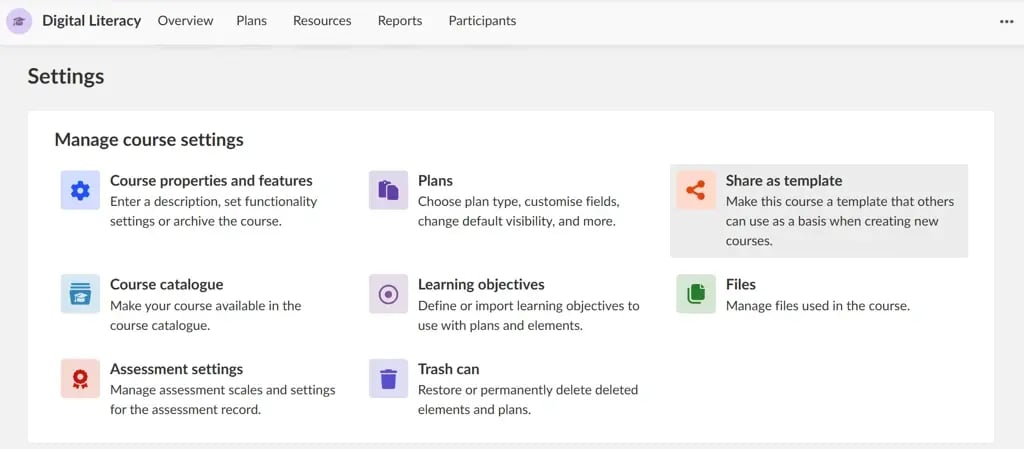 Before using a course as template, you can now preview it to see what you will get.
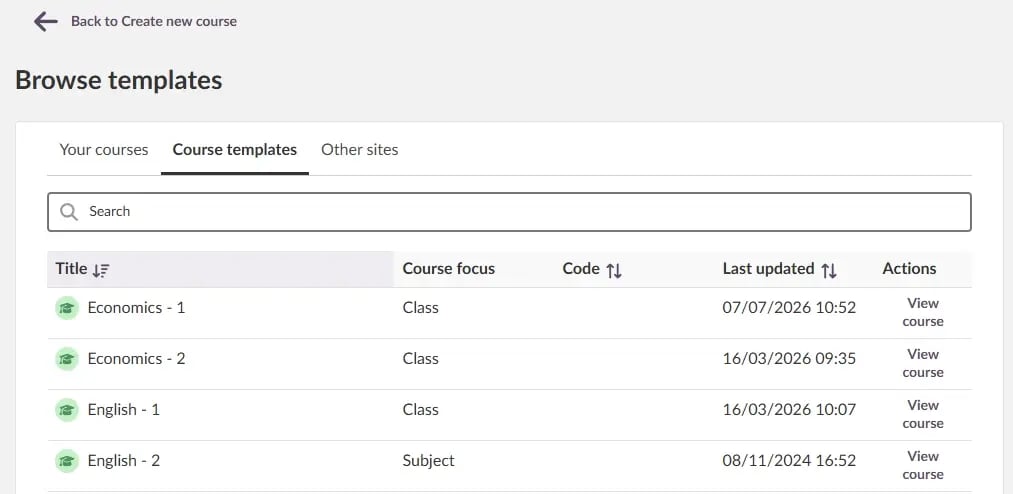
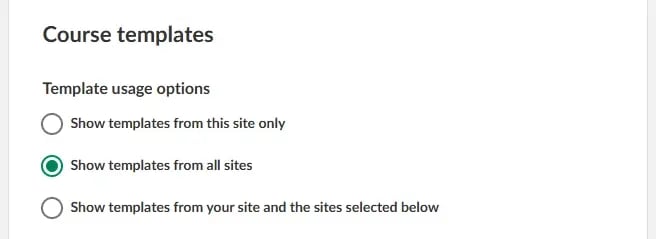
It is now possible to share course templates with other itslearning sites, for example when collaborating with other institutions. Note that the system administrator need decide if it is possible to see templates from other sites (under Features and security), and who can share templates with other sites (via a Profile setting).
Full documentation for both roles is available in the itslearning Support Portal:
This feature is part of the German Development Project (GDP), a collaboration between four German states and itslearning aimed at enhancing digital education in Germany through tailored product developments. Learn more about the GDP roadmap and what other features you can expect to see. For German readers, more details on the German Development Project are made available on our webpages.
Deleting elements that are added to multiple plans
Teachers can add the same element to multiple plans. When they select the action "Delete from course", they should know that the element is connected to multiple plans and will be deleted from all of them.
Students can now sort plans directly within the table view. This sorting is personal and temporary:
| Area | Reference | Summary |
|---|---|---|
| Class | ITS-106744 |
If a class course had a topic with more than one connected folder, it did not work to open. The issue was fixed. |
| Instant messaging | ITS-106731 |
Fixed an issue in messaging. It did not work correctly to use the scrollbar to see more messages. |
| Working/Assessment Portfolio | ITS-99067 |
Fixed an issue that could occur when transferring a file from the working portfolio to the assessment portfolio. The issue could affect files that were added to the working portfolio from Google Drive. |
| Area | Reference | Summary |
|---|---|---|
| 2FA | ITS-105537 |
Fixed an issue that could cause an error when an admin logs in. The error would only happen if the user was set to change the password on login combined with getting a request to connect with two-factor authentication. |
| Assignment | ITS-106840 |
Fixed a bug that could cause assignments to have an incorrect status after importing to a course via cross-site templates. |
| Planner | ITS-100749 |
In rare cases drag and drop of plans in a list of plans would not save the new order. This was fixed. |
You can now create Page elements in the Projects area of itslearning. This is part of our planned transition from Note to Page. We'll share more information about the discontinuation of Note and the migration of existing content in the coming weeks.
When you open a resource from the Content Map and then use the Back button to return, the folders you had expanded will remain open. This makes it easier to continue from the same place without having to expand the folder structure again.
If you leave the Content Map, for example by navigating to Resources or Trash can, the folders will be collapsed the next time you open the Content Map.
The course description block is used in Information hub courses and Self-paced learning courses. We have updated the placeholder image in the course description block to use a 2:1 aspect ratio, ensuring it matches the proportions of actual uploaded images and takes up less space.
We want to better support new and experienced teachers when setting up their course. As a first step, we are updating the empty state card for plans on the course homepage. There will be one card for courses with no plans, and another card for courses that contain plans without a date. Each card will include a link to an external information page where teachers can learn more about plans. The cards will only be visible to teachers.
.png?width=532&name=Screenshot%202026-09-02%20at%2013.51.48%20(c4d7d026-60b3-41ac-8319-340ec1d2d71b).png)
| Area | Reference | Summary |
|---|---|---|
| Assessment record | ITS-104486 |
Made an improvement to the Assessment record. When exporting, assessment status is included when the student did not submit. |
| Calendar | ITS-106579 |
Fixed an issue that could cause an error when a student opened a plan connected to a course group, dependent on access to the course group. |
| Collaboration folders | ITS-106694 |
Fixed an issue where the setting "Use Higher Education language overrides" did not work with collaboration folders. |
| ITS-106611 |
Fixed an issue in collaboration folders that caused students not to be able to change properties, like the name of a page. |
| Area | Reference | Summary |
|---|---|---|
| Library | TT-6141 |
Fixed an issue that could cause an error when a student tried to open a test added from the Library. |
Teachers can now permanently delete a content block directly from its More options (...) menu. A confirmation is shown before deletion.
This provides a quicker alternative to first archiving a content block and then deleting it from the Archive.
To simplify navigation and meet accessibility requirements, the global menu and course menu now remain visible when opening a single plan page, play plan, or the table view.
| Area | Reference | Summary |
|---|---|---|
| Assessment record | ITS-100790 |
In Assessment record. As a teacher opening a submission from a student, where the student no longer has access to the resource, the teacher would see an error that didn't make sense. The error message was updated. |
| File/Folder | ITS-106598 |
Collaboration folders were using the wrong icon in courses where differentiated plans were enabled. This was fixed. |
| Page | ITS-106631 |
Fixed an issue that could cause tree-links on a page to not be copied correctly, when a page with tree-links was copied to another location. |