
WHY ITSLEARNING
See why schools choose a European LMS designed for education over generic platforms.
See why schools choose a European LMS designed for education over generic platforms.
itslearning empowers teachers and helps all students reach their full potential.

Translation generated by an AI translation service
A teacher's day is rarely spent at one desk. Submissions get checked between lessons, feedback gets recorded on the way home, and teaching material is often found on a phone long before it reaches a computer. Until now, much of that still meant opening a browser to finish the job.
The latest itslearning app update moves more of those everyday tasks into the app itself. Teachers can review and assess submissions from a phone or tablet, send files from other apps straight into Your files, and navigate class courses more easily on mobile.
Here is what's new for teachers.
Not every assessment belongs on a mobile device. Reviewing lengthy assignments or writing detailed feedback is still easier on a computer. But many day to day assessment tasks are quick, and they don't always need to wait until the teacher is back at their desk.
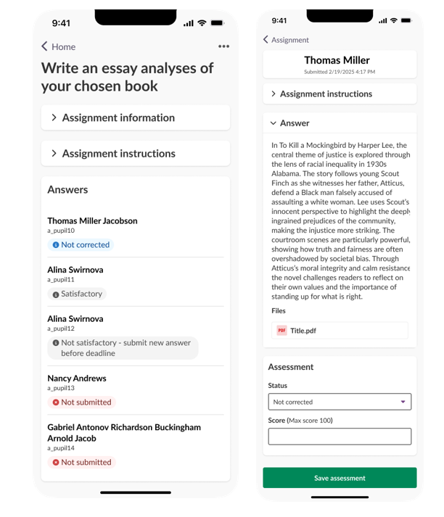
With the latest app update, teachers can review submissions, track student progress and complete simple assessments directly from a phone or tablet.
The assignment view presents the student list, where teachers can quickly see who has submitted their work, who hasn't, and which submissions have already been assessed. This gives teachers a clear overview of class progress without needing to open the full course in a browser.
Teachers can review and assess students' work by:
Assignments completed outside itslearning can also be assessed in the same workflow, using either grading scales or points, depending on how the assignment was configured.
For activities that don't require a digital submission, such as reading a chapter, participating in a classroom discussion or completing practical work, teachers can simply mark the task as done for each student, similar to the browser version.
All assessments made in the app automatically sync with the course in itslearning, ensuring everything stays up to date across devices.
Teachers use a wide range of apps throughout the school day. Whether it's taking photos during a science experiment, recording a video presentation, or adding notes to a document, the challenge has been to get those files into itslearning.
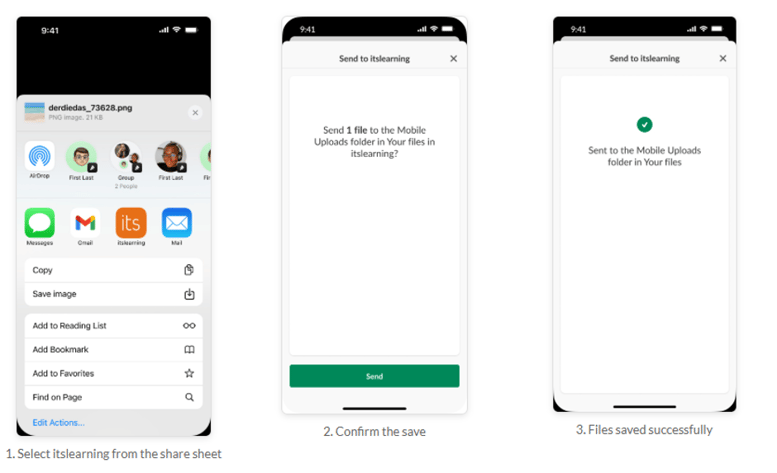
With this update, that step takes less time than before. The itslearning app now integrates with your device's native share function, so files can be sent directly from other apps into itslearning without saving them first or switching between applications.
Instead of downloading files and uploading them later from a computer, teachers can now send files directly from other apps to Your files in itslearning. It lets educators collect teaching materials while they're still open on the device, whether it's a PDF, an image, or another resource they plan to use in an assignment or other activities in class.
Sharing files as soon as they are created helps both teachers and students stay organised and reduces the risk of important content being lost or forgotten.
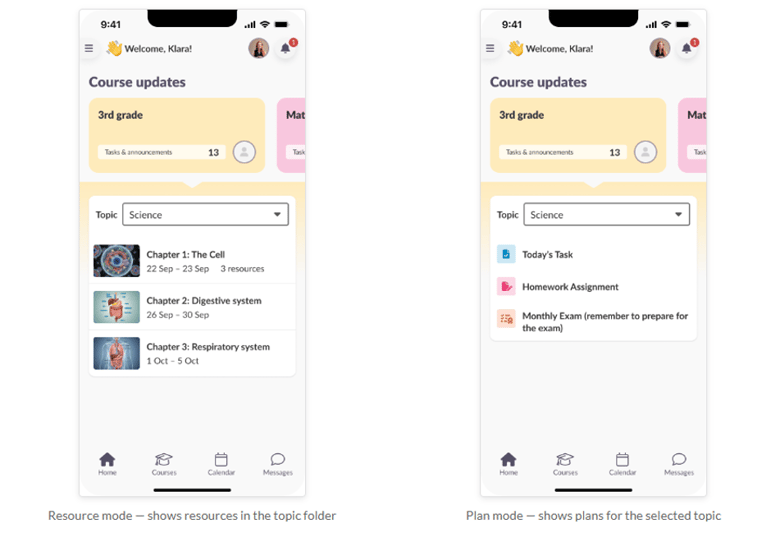
Many primary schools, and some vocational schools, organise teaching around class courses, where one or more teachers teach several subjects within the same course. This approach lets students find everything they need in one place, while topics help organise content by subject.
Read more on Class Course
The latest app update makes navigating these courses more intuitive also on mobile.
Topics are still created and managed in the browser, while the mobile app focuses on making day to day navigation simpler for both teachers and students.
These changes are small individually, but they add up over a school day. A set of submissions can be checked between lessons. A resource found on a phone goes straight into Your files. A quick assessment gets recorded while it's still fresh, and syncs to the course before you sit down again.
The computer is still the better place for detailed feedback and course design. The app now covers the rest.
To learn more about these features and how to use them, read our support articles:
This feature is part of the German Development Project (GDP), a collaboration between four German states and itslearning aimed at enhancing digital education in Germany through tailored product developments. Learn more about the GDP roadmap and what other features you can expect to see. For German readers, more details on the German Development Project are made available on our webpages.