
WHY ITSLEARNING
See why schools choose a European LMS designed for education over generic platforms.
See why schools choose a European LMS designed for education over generic platforms.
itslearning empowers teachers and helps all students reach their full potential.

Translation generated by an AI translation service
Schoolwork rarely stays at a desk. It happens on the bus, at the kitchen table, in the gap between two lessons, and often on a phone or tablet. This latest update simplify some of those everyday tasks.
Assignments can be opened, answered and submitted directly in the app, work continues when the connection drops, and files can be sent into itslearning straight from the app they were created in. Class courses are also easier to navigate on a small screen.
Here is what's new for students.
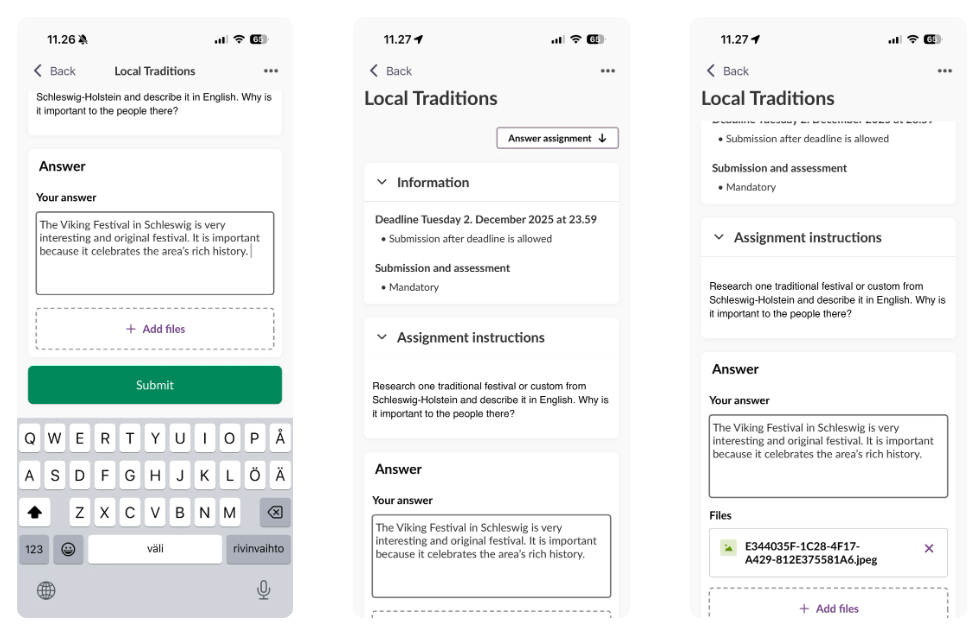
Students can now view, complete and submit assignments without leaving the itslearning app.
Assignments that haven't been submitted appear on the home screen for quick access. Home screen acts this way like a to-do list for students. Opening an assignment gives students everything they need to get started, including:
From there, students can:
Work anywhere, even offline
Schoolwork doesn't always happen with a reliable internet connection. Students may be travelling, working from home, or moving between classrooms. That's why the app includes offline support for assignments making them available even without internet access. The app also saves work in progress, allowing students to pause and continue later or submit once they're back online.
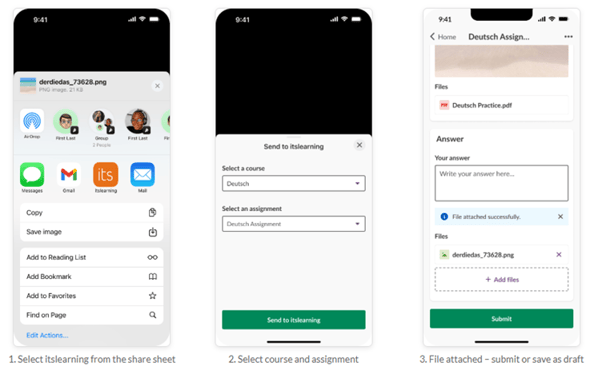
Students use a wide range of apps throughout the school day. Whether it's taking photos during a science experiment, recording a video presentation, or adding notes to a document, the challenge has been to get those files attached to assignments.
With this update, that step takes less time than before. The itslearning app now integrates with your device's native share function and you can send files directly from other apps into itslearning without saving them first or switching between applications.
Students can now share photos, videos, screenshots and other files directly to assignments from the app where they were created. After sharing, they can submit the assignment immediately or save it as a draft to finish later.
It's an improvement that removes unnecessary steps and makes it easier for students to capture learning as it happens.
Many primary schools, and some vocational schools, organise teaching around class courses, where one or more teachers teach several subjects within the same course. This approach lets students find everything they need in one place, while topics help organise content by subject.
Read more on Class Course here: https://itslearning.com/blog/class-course
The latest app update makes navigating these courses more intuitive also on mobile.
When students open a class course, they'll now see course announcements first, ensuring important updates are always easy to find. Course announcements are visible for all course types. From there, they can use a topic filter to quickly switch between subjects such as Science, Mathematics or Languages.
Together, these changes mean students can do more of their schoolwork in one place. An assignment can be read, answered and submitted from a phone. A photo taken in the science lab can go straight into a submission. A weak connection no longer stops the work, and a class course opens on the announcements that matter that day.
To learn more about these features and how to use them, read our support articles.
This feature is part of the German Development Project (GDP), a collaboration between four German states and itslearning aimed at enhancing digital education in Germany through tailored product developments. Learn more about the GDP roadmap and what other features you can expect to see. For German readers, more details on the German Development Project are made available on our webpages.