

WHY ITSLEARNING
See why schools choose a European LMS designed for education over generic platforms.
See why schools choose a European LMS designed for education over generic platforms.
itslearning empowers teachers and helps all students reach their full potential.
.gif?width=300&name=Blog%20Banner%20-%201366x768%20(2).gif)
Translation generated by an AI translation service
Each student is unique, and differentiation is one of the clearest ways to make learning more effective for the individual learner. The Planner is the core tool in itslearning for organising teaching and learning activities. Until now, teachers could only assign plans to all participants in a course. With Differentiated Plans, teachers can assign a plan to specific students or groups, supporting personalised learning without creating separate courses.
No two students learn in exactly the same way. In every classroom, teachers support students with different levels of prior knowledge, learning needs, interests, and confidence.
Research suggests that differentiated instruction can improve engagement and learning outcomes by adapting teaching, resources, and activities to meet students' varying needs. Rather than expecting every learner to complete the same activities at the same pace, differentiation gives teachers the flexibility to provide the right level of support and challenge.
In practice, differentiation can look like:
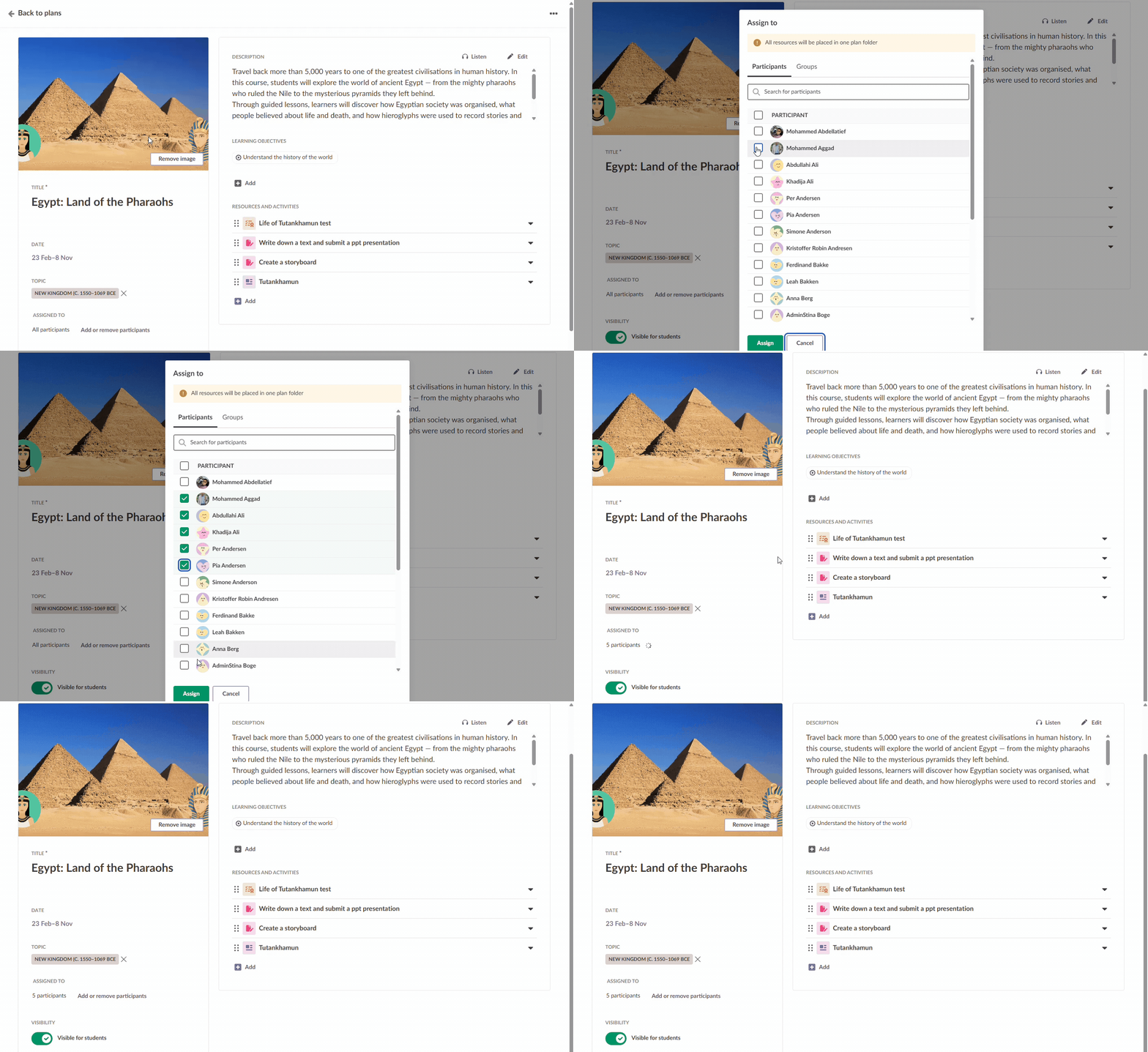
With Differentiated Plans, teachers can:
When Differentiated Plans is turned on for a course, plans and resources become more closely connected. Each plan that is assigned to specific users gets a separate plan folder in Resources.
Adding topics to plans is not mandatory. When topics are used, topic folders are created even if the setting for creating a topic folder is not selected. Teachers can edit the name of topic folders and plan folders in Resources, and any changes made there will update the title in Plans as well.
There are three layers to switching this on:

Once Differentiated Plans is enabled for your course:
Once the plan is assigned, other students in the course cannot see or access it. Any elements added to the plan, such as resources or activities, will only be visible to the students the plan is assigned to, both on the Plans page and in Resources.
Differentiated Plans makes it easier to deliver personalised learning within the same course. By assigning plans, resources, and activities to the students who need them, teachers can provide the right level of support and challenge without additional courses or administrative overhead.
Read our support article for more information.