
WHY ITSLEARNING
See why schools choose a European LMS designed for education over generic platforms.
See why schools choose a European LMS designed for education over generic platforms.
itslearning empowers teachers and helps all students reach their full potential.

Translation generated by an AI translation service
When a course ends, students often lose access to the files inside it. Resources they used during the term, such as documents, presentations, and videos, become unavailable the moment they are removed from the course or the course itself is closed. For many students, this happens at exactly the wrong time: during revision, at the start of a new school year, or when moving on to the next stage of their studies.
Students can now save a file resource is in itslearning. It gives students a way to keep copies of file resources from their courses, stored inside itslearning .
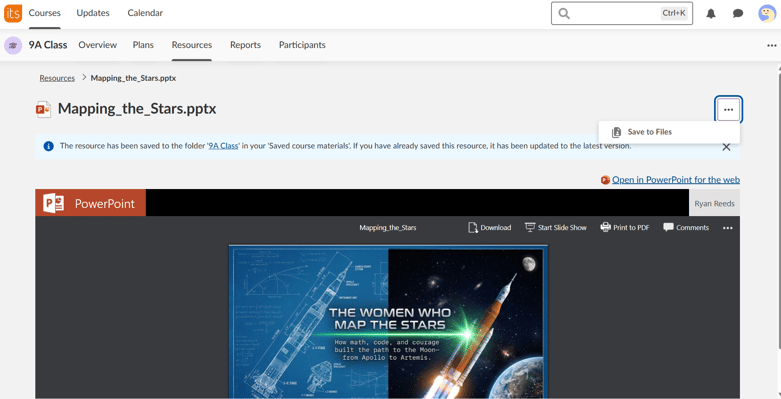
When the feature is enabled, students can save individual file resources from a course directly to their Files area. Saved files are stored in a course-specific folder under a section called Saved course materials. They are copies, not links back to the course. This means students retain access to them even after the course has ended, after they have been removed from the course, or after the course has been deleted from the platform entirely.
If a student saves a resource they have already saved before, itslearning updates the existing copy to the latest version rather than storing duplicates.
Students can save file resources from a course. This includes common document types such as Microsoft Word, Excel, and PowerPoint files, as well as image, audio, and video files. Content types such as Pages cannot be saved using this feature.
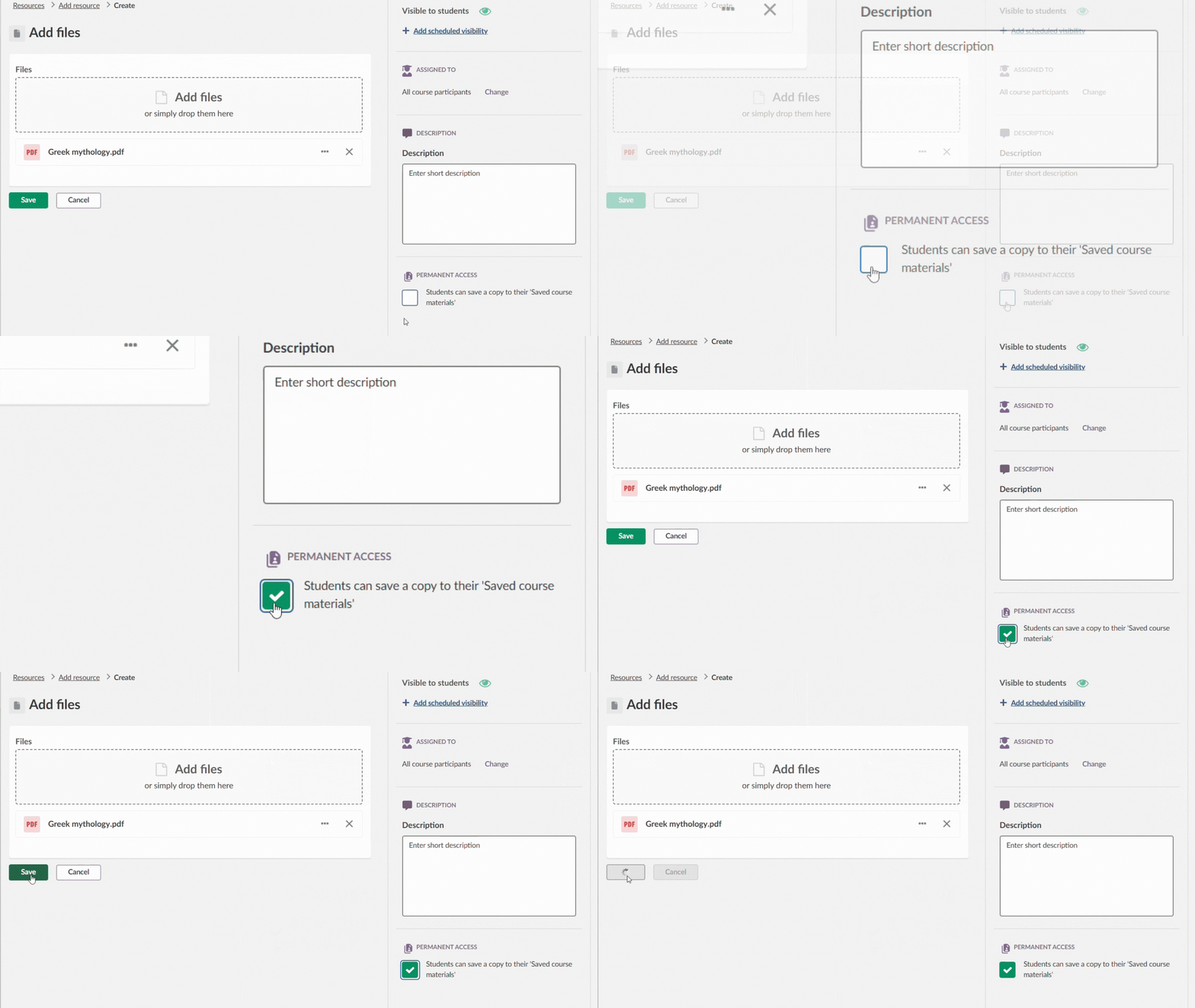
Teachers can decide which file resources students are allowed to save, at the level of individual resources. By default, when the feature is enabled at site level, students can save any file resource in a course. A teacher can turn off the save option for a specific resource, which removes the save button from the student view for that file.
This setting applies within itslearning. It does not prevent students from downloading a file directly to their device while they still have access to it.
Files placed inside a Collaboration Folder work differently. Any participant with access to the folder can save those files, regardless of the teacher setting on individual resources. This applies to files added by teachers and files added by students alike.
The feature is controlled at site level by a site administrator. Once an administrator enables the setting, it becomes available across all courses on the site. Teachers can then manage it at the individual resource level.
Students move between courses, year groups, and schools. A useful explanation, a worked example, or a set of notes from a teacher does not lose its relevance when a course closes. Saved Course Materials gives students an organised place to keep those files inside itslearning.
For schools and districts, the feature also supports continuity. When students transition between year groups or move to a new school on the same platform, their saved materials are still accessible. The files remain in their personal Files area in itslearning, available whenever they need them.
For setup instructions and full technical details, visit the itslearning Support Portal.
This feature is part of the German Development Project (GDP), a collaboration between four German states and itslearning aimed at enhancing digital education in Germany through tailored product developments. Learn more about the GDP roadmap and what other features you can expect to see. For German readers, more details on the German Development Project are made available on our webpages.