
WHY ITSLEARNING
See why schools choose a European LMS designed for education over generic platforms.
See why schools choose a European LMS designed for education over generic platforms.
itslearning empowers teachers and helps all students reach their full potential.

Translation generated by an AI translation service
International schools rarely teach just one curriculum. A single school might have IB students in one year group, Cambridge students in another, and a national curriculum running alongside both. With itslearning you can centralise learning objectives from different curriculums in one platform, ensuring consistency and continuity.
When teachers get a collaborative workspace that respects each programme's assessment language, students and parents get a clear view of progress, and school leaders get a dependable foundation for academic excellence and accreditation. When your platform works in harmony with your frameworks, your school can stop managing disconnected systems and focus on what matters: inspiring learning every day.
The real challenge for international schools isn't delivering multiple curricula, it's doing so without multiplying platforms. School leaders and teachers have to navigate all of it at once, giving each curriculum the structure and visibility it needs while keeping teaching, learning, and assessment coherent across the school.
This is where learning objectives in itslearning come in. This article explores how the feature works and what it means for school leaders, educators, and administrators managing multiple curricula in a single digital learning environment.
Consider a Grade 12 cohort in an international school. Some students are completing the IB Diploma Programme, while others are following the IB Career-related Programme.
The students are taught by many of the same teachers, use the same school systems and are part of the same school community, but the learning objectives, terminology and assessment requirements for each pathway are different.
The situation becomes even more complex when school leaders want to answer seemingly simple questions: What are students expected to learn? How are those expectations being assessed? Are curriculum requirements being covered? And how can we get a meaningful overview of learning across the whole Grade 12 cohort without asking teachers to maintain separate systems for each programme?
The challenge is not delivering multiple curricula; it is managing their differences while maintaining a consistent approach to teaching, learning and reporting across the school.
At itslearning, all curricula can be imported into the platform through the Learning Objectives Tool, which gives every teacher a shared starting point. Objectives are held centrally, organised by programme, subject, and year group, and available to any course across the school.
Learning objectives are statements of what students are expected to know or accomplish after completing a set of tasks. In itslearning, you can align your course to learning objectives to track student progress and mastery.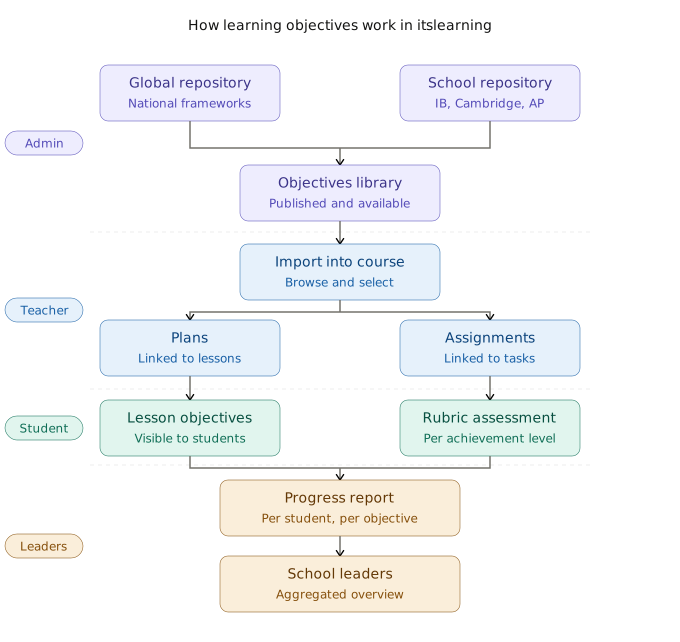
Learning objectives in itslearning come from two primary sources:
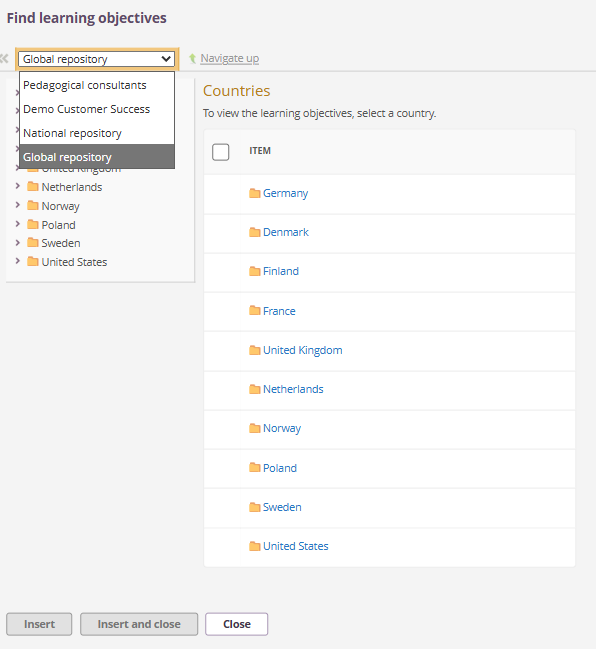
Once objectives are in the repository and published, teachers can import them directly into their courses.
A teacher building a course opens the course settings, browses the repository, and selects the objectives relevant to their unit. Those objectives then appear in two main areas:
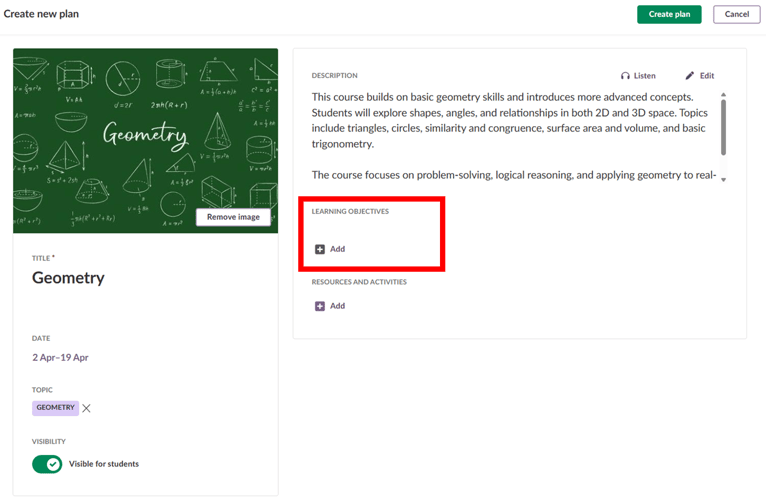
In the Planner. When a teacher links learning objectives to a lesson plan, students can see which objectives that lesson covers. This is visible before the lesson, during it, and when students review their work. Students who join mid-year or move between teachers can see what the course covers and how it is structured.
Individual resources and activities. When a teacher links learning objectives to an assignment, or task they can assess student work using a rubric. The rubric is built from assessment criteria attached to each objective. Each criterion has defined performance descriptions at each achievement level.
Each course in itslearning can use its own assessment scale. The number of levels and their labels are configurable, either by the system administrator for the whole school or by the teacher for a specific course. This means a Cambridge course and an IB course can each use the assessment language of their own programme, within the same platform.
Assessment criteria can be attached to each objective. These criteria define what performance looks like at each level. Teachers can create their own criteria, or they can search for criteria that colleagues across the school have already created and shared. Sharing is available for criteria attached to objectives imported from the repository. This makes it possible for consistent rubrics to spread across departments without requiring a top-down mandate.
The results of rubric assessments feed automatically into the Learning Objectives Assessment Report, which operates independently of the traditional Gradebook or Assessment Record. The report provides clear insights through three distinct views:
When mastery tracking is enabled by an administrator, progress bars indicate when a student has met the configured mastery threshold a required number of times. When mastery is disabled, the report simply reflects each student's most recent assessment status.
Progress tracking is not restricted to individual course silos. Students and parents have access to a cross-subject report directly on their main dashboard or course cards homepage, displaying overall objective progress across every enrolled course. Whether a student is navigating IB Sciences, Cambridge Math, or AP History, parents and learners get one consistent dashboard view of progress across all subjects.
For a School Leader, the practical benefit is clear. IB, Cambridge, AP, and national objectives can sit in parallel within one platform. The structure reflects the way the school works. Every teacher works from the same shared framework. Students, parents, and school leaders see the same information in the same place.
When students can see which objectives each lesson covers, they have a clearer understanding of what they are working towards. When parents can see how their child is progressing against those objectives, the conversation between home and school becomes more specific. When school leaders can see that data across year groups and programmes, they have a more accurate picture of learning quality across the school.
By centralising learning objectives within itslearning, international schools replace operational complexity with clarity, consistency, and
continuity. Teachers gain a collaborative workspace that respects their programme's unique assessment language, students and parents enjoy a clear roadmap of progress, and school leaders secure a dependable foundation for long-term academic excellence and accreditation. When your learning platform works in harmony with your frameworks, your entire school community can move away from managing disconnected systems and focus on what matters most: inspiring learning every single day.
Want to hear how international schools have made this work in practice? Watch our webinar, 'From Vision to Everyday Practice: How to Implement an LMS Successfully'. Two international school principals share over a decade of experience, including what they would do differently from the start.

Every organisation’s needs are unique, and so are our product demonstrations. In your tailored walkthrough, we’ll highlight the tools and features most relevant to you, and share success stories from institutions like yours.