WHY ITSLEARNING
See why schools choose a European LMS designed for education over generic platforms.
See why schools choose a European LMS designed for education over generic platforms.
itslearning empowers teachers and helps all students reach their full potential.

Translation generated by an AI translation service
We publish release notes a few days before each mid-week update. If you are reading this, the update will be available soon. Please note that release dates may change. Some features are also released gradually, which means not all users will see them at the same time. If a feature you expected is not yet available, it will appear soon.
Topic folder is automatically created in Resources
The "Create folder for each new topic" option has been removed from Plan settings in new courses. Now, whenever you add a topic, a matching topic folder is automatically created in Resources. You can still create plans without topics, no folders will be created unless a topic is added.
If your course is based on a template where the folder setting is not enabled, you'll still see the option in Plan settings and can turn it on manually.
| Area | Reference | Summary |
|---|---|---|
| Administration | ITS-99874 | Fixed an issue in the "Edit global settings" menu (for system administrators). The link to go to Cloud services settings was not working correctly. |
| Planner | ITS-99964 | When importing ready-made content under the "from publisher" tab, only the first topic was showing. This was fixed. |
| Area | Reference | Summary |
|---|---|---|
| Announcements | ITS-99794 | Fixed an issue that caused rich text content containing mailto: and tel: links to give an error when saving in an announcement. |
| User and access management | ITS-99788 | Some users (users created via the external course catalogue) were deleted after 30 days of inactivity. This function was disabled, and the users were restored. |
Teachers can now more easily customise their course cards by uploading and cropping images directly within itslearning. This improvement makes it simpler to create visually appealing course cards for better course recognition.
With this update, teachers can:
This enhancement improves visual customisation of course cards, helping teachers highlight their courses in a way that's clear and accessible to all learners. The feature is now available to all users.
See also the user guide for new course card images for more detailed information.
.png)
.png?width=1276&height=842&name=Screenshot%202025-08-05%20at%2012.49.50%201%20(5839f9be-07cf-4308-8d1e-2cb4b2f0590d).png)
The course card image and cropping functionalities are part of the German Development Project (GDP), a collaboration between four German states and itslearning aimed at enhancing digital education in Germany through tailored product developments.
Learn more about the GDP roadmap and what other features you can expect to see.
For German readers, more details on the German Development Project are made available on our webpages.
We've continued our work to remove iframes from itslearning. The menu in Course Settings is now frameless, which helps improve usability and consistency across the platform.
The Course Properties and Features section has been updated to use a frameless layout. This is part of our continued work to improve consistency and accessibility across itslearning.
The Course Catalogue has been converted to a frameless layout. This update supports our ongoing efforts to make itslearning more consistent and accessible.
As part of our ongoing work to improve the help system in itslearning, we've removed a number of outdated help links that no longer worked or led to useful content.
The Course Banner section in Settings is now frameless. This change is part of our ongoing effort to make itslearning more consistent and accessible.
We've converted the Course > Settings > Files page to a frameless layout.
Teachers can now use rich text formatting when creating announcements, making it easier to highlight and structure important information for their pupils. The new editor provides options to:
The editor also supports common keyboard shortcuts for quicker formatting (for example, Ctrl+B or Cmd+B for bold).
This improvement makes it easier to create clear, engaging announcements that are accessible to all learners. The feature is available immediately for all users.
See also the user guide for updated announcements for more detail.
.png?width=807&height=544&name=Screenshot%202025-04-25%20at%2013.22.28%20(902be68f-cbab-41af-97f8-d1747d25ccb4).png)
The rich-text formatting in announcements is part of the German Development Project (GDP), a collaboration between four German states and itslearning aimed at enhancing digital education in Germany through tailored product developments.
Learn more about the GDP roadmap and what other features you can expect to see.
For German readers, more details on the German Development Project are made available on our webpages.
| Area | Reference | Summary |
|---|---|---|
| Registrations | ITS-98491 | Made an update to the Registration tool, to improve performance in courses with many users. |
We've made it easier to offer flexible learning experiences! When creating a new course, teachers and administrators can currently choose between two course focuses:
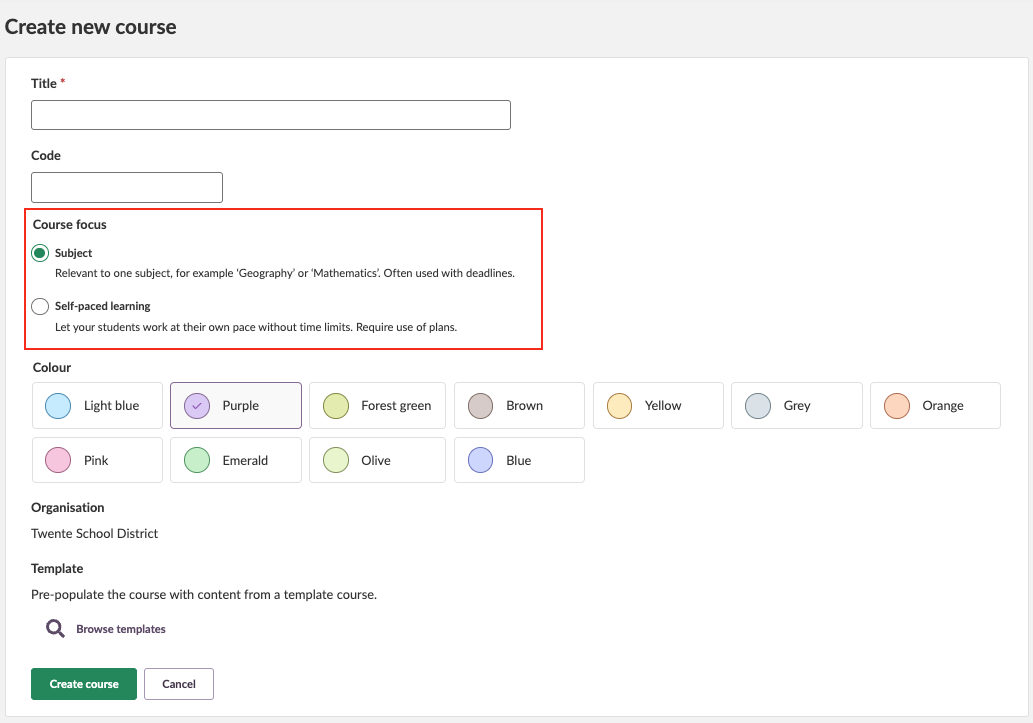
Subject:
Teacher-led courses are organized by subject, such as Natural Science or English. This format is similar to what is currently offered in itslearning.
Self-paced learning:
Self-paced courses are built around our planner, allowing students to work through content at their own pace. Plans have no time restrictions, giving learners the flexibility to progress when they're ready.
Teachers can choose to set up the course with a linear approach using 'One plan at a time,' where students unlock each plan sequentially, or a more flexible approach with 'All plans at once,' giving access to all content from the start.
You can change the course focus in Course properties and features at any time without loosing content or student data.
To make your experience smoother across our tools, we've updated the terminology used in the Resources section. Instead of "Active" and "Inactive," you'll now see "Visible" and "Not Visible." in the status tags. In the Action menu we have changed "Activate" and "Deactivate" to "Make visible" and "Make invisible"
This change is designed to reduce confusion when switching between Resources and Planner, where similar terms had different meanings. It's a small tweak-but one that makes navigating more intuitive and consistent.
Search results can now be filtered by course on the advanced search and all results pages.
The new filter allows users to search and select courses by title to narrow results to any course they are enrolled in. Selecting a specific course will show results only from that course, while leaving the filter empty will include results from all courses.
Note*:* If the status filter is set to 'active' or 'archived', the course search will only return courses that match the selected status.