WHY ITSLEARNING
See why schools choose a European LMS designed for education over generic platforms.
See why schools choose a European LMS designed for education over generic platforms.
itslearning empowers teachers and helps all students reach their full potential.

Translation generated by an AI translation service
We publish release notes a few days before each mid-week update. If you are reading this, the update will be available soon. Please note that release dates may change. Some features are also released gradually, which means not all users will see them at the same time. If a feature you expected is not yet available, it will appear soon.
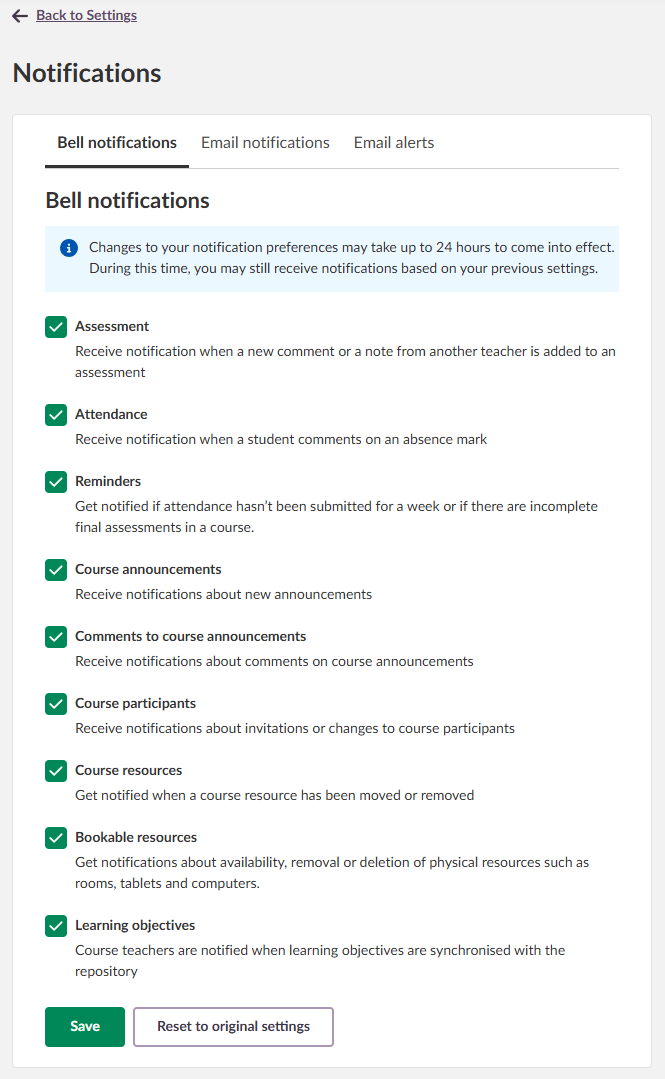
Notification Preferences allow users to control which notifications they receive and how they receive them. For bell notifications, users can manage their settings in two ways: by notification category or by course. As before, users can also choose to receive notifications by email from messages and bell notifications.
Notification categories determine which updates appear in the notification bell. Users can select the types of updates they want to see - such as assessments, attendance, course announcements, or learning objectives - ensuring they only receive the information most relevant to them.
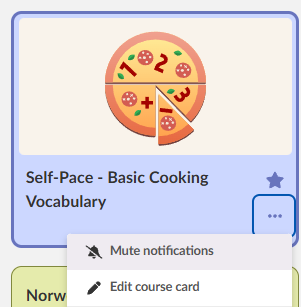
Users can also mute notifications from individual courses if they do not need any updates from them.
More info in our blog:
https://itslearning.com/blog/notification-preferences
| Area | Reference | Summary |
|---|---|---|
| Assessment record | ITS-104119 |
Fixed an issue where an extra top menu could appear after navigating from an assessment back to the Assessment record. |
| Course Overview Page | ITS-100080 |
Fixed an issue in courses that could occur after pasting an HTML code snippet containing certain elements into a Calendar event. Due to an issue with interpreting the HTML code, it could lead to not being able to open the course overview. |
| Trashcan | ITS-101055 |
When permanently deleting a large amount of users from the trash can. Depending on the amount of users selected, it could lead to a timeout error. This was fixed. |
| Area | Reference | Summary |
|---|---|---|
| AICC | ITS-103738 |
Depending on site settings, a few customers had an issue with opening web links. A fix was done to make sure ordinary web links work even if AICC and SCORM communication is turned off on the site. |
| ePortfolio | ITS-103662 |
Fixed a bug that caused opening an ePortfolio shared with a password to not work. |
| Planner | ITS-103642 |
A bug caused some teachers to lose access to plans in courses where they are not a participant. This was fixed. |
| Area | Reference | Summary |
|---|---|---|
| Calendar | ITS-103342 |
Some users got an error when trying to edit a parent dashboard. The issue happened for users that are a member of a course with a calendar event in the future, and the event is connected to a plan. |
| Course Administration | ITS-103636 |
As an admin user. When entering a course from the course administration view. The start page setting did not work. This was fixed. |
| Extensions | ITS-103773 |
Fixed an issue that could cause scrolling to not work when opening certain external content. |
| Link | ITS-103768 |
In a previous update how AICC links are generated was changed. This lead to an issue that could affect some customers. This was fixed. |
| Area | Reference | Summary |
|---|---|---|
| Link | ITS-103696 |
Fixed an issue that caused an error when a user opened an AICC link (link to external resource). |
We're introducing Custom Labels in itslearning - a simple, flexible way to give students clearer guidance on assignment expectations. Many teachers want an easy method to indicate whether AI tools may be used, if collaboration is allowed, or if the task later will be presented. Custom Labels make this possible.
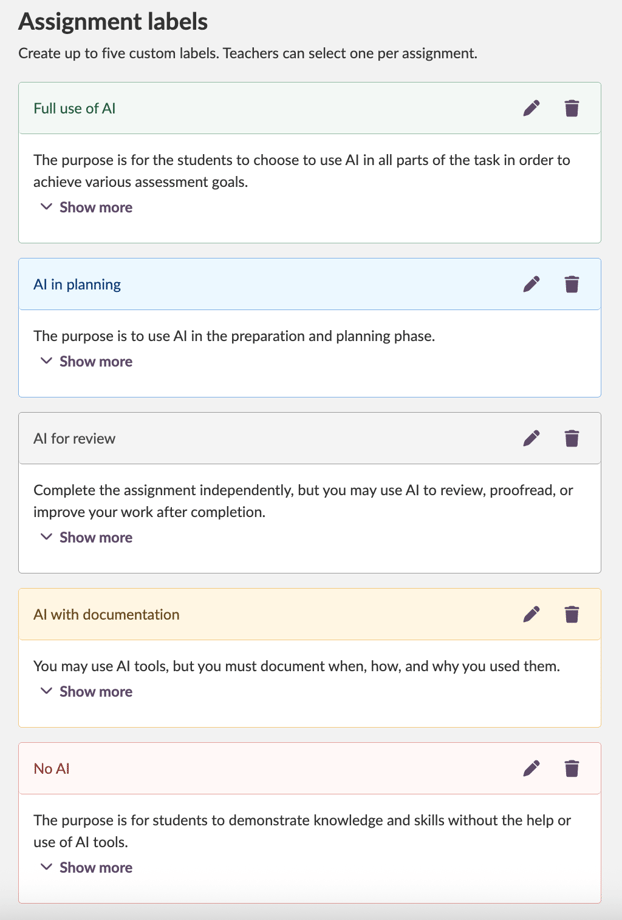
For more details, check out our support articles for teachers and administrators here.
| Area | Reference | Summary |
|---|---|---|
| Profiles | ITS-102048 |
Fixed an inconsistency on profile cards related to visibility of certain fields. |
| Resources | ITS-103531 |
In courses where learning objectives are turned off in the course settings. Due to a bug it was not possible to create or edit SCORM courses. This was fixed. |
| Area | Reference | Summary |
|---|---|---|
| Test 3.0 | TT-6109 |
Fixed an issue that could cause a teacher to get an error and not be able to exit a test when using "preview test in test mode" option. This could happen if the teacher used the preview more times than the attempts limit set on the test for students. |