WHY ITSLEARNING
See why schools choose a European LMS designed for education over generic platforms.
See why schools choose a European LMS designed for education over generic platforms.
itslearning empowers teachers and helps all students reach their full potential.

Translation generated by an AI translation service
We publish release notes a few days before each mid-week update. If you are reading this, the update will be available soon. Please note that release dates may change. Some features are also released gradually, which means not all users will see them at the same time. If a feature you expected is not yet available, it will appear soon.
We are pleased to announce that the Permission system has been updated. It now offers improved accessibility and a modern design that supports a more efficient workflow and a better user experience.
.png?width=401&name=Screenshot%202026-02-17%20at%2012.13.53%20(662f5ba3-17b8-4468-bea5-5d7d3154469a).png)
A permission system is the framework that determines who can access, view, or manage different parts of a platform. It defines roles such as Student, Teacher, and Guest, and assigns each role specific rights.
Learn more
Would you like to read more about this update? You can find additional details in this blog post
Looking for the support article? This support article will guide you step by step through the new update.
This feature is part of the German Development Project (GDP), a collaboration between four German states and itslearning aimed at enhancing digital education in Germany through tailored product developments.
Learn more about the GDP roadmap and what other features you can expect to see.
For German readers, more details on the German Development Project are made available on our webpages.
When listing multiple courses in itslearning - for instance when opening All courses or browsing your templates we will also display the course focus.
.png?width=812&name=Screenshot%202026-02-13%20at%2016.56.36%20(8718888c-b075-4ad2-8907-161f006518e4).png)
In this release, we have updated the Links page. It is now simpler, faster, and has more consistent look and feel with the rest of the platform.
The Links page is an optional feature that only some courses use, as most teachers prefer to add link lists directly in course materials. When Links is enabled in the course properties, a link to the page appears in the course menu. All course participants can add links on the page.
With this update, we have also simplified the page based on usage analysis and removed the following rarely used features:
.png?width=800&name=image-20260218-075352%20(0647bd70-1e5b-4fda-8ce0-94ae7aaa6c9b).png)
| Area | Reference | Summary |
|---|---|---|
| Assessment record | ITS-103079 |
Fixed an issue where trying to create an assessment letter from the course assessments tab could lead to an error. |
| Assignment | ITS-103352 |
Fixed an issue that could cause an "access denied" error when opening an assignment from follow-up tasks in course with self-paced setting enabled. This affected assignments connected to a plan. |
| Course Administration | ITS-103467 |
Fixed an issue that caused start pages to not load in courses that use self-paced plans. Users were instead taken to the course overview page. |
| Planner | ITS-102373 |
Fixed an issue that caused links to resources in a plan to not work for guest users. |
| Area | Reference | Summary |
|---|---|---|
| IMS-ES | ITS-101517 |
Fixed an issue related to IMS-ES. The field "allowconnectiontocourse" was missing in the response for certain requests. |
| Registrations | ITS-101948 |
Fixed an inconsistency in the Registrations course tool, related to visibility of certain fields. |
We are introducing a redesigned Resource Page that is more accessible, easier to navigate, and aligned with a modern user experience. This update supports our ongoing commitment to ensure that itslearning works well for all users.
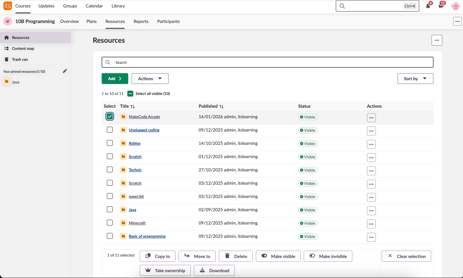
Accessibility has been the main focus of this redesign. Our aim was to ensure that users can access, manage, and explore their resources without barriers.
To achieve this, we have replaced outdated components with more inclusive and user???friendly solutions. One key improvement is the removal of the old resource tree, which did not meet accessibility requirements. Based on user feedback, we have introduced a more intuitive and accessible alternative: the Content Map.
The new update will be enabled for all users on Thursday, 12 February at 07:00 CET.
Would you like to read more about this update? You can find additional details in this blog post.
Looking for the support article? This support article will guide you step by step through the new update.
This feature is part of the German Development Project (GDP), a collaboration between four German states and itslearning aimed at enhancing digital education in Germany through tailored product developments.
Learn more about the GDP roadmap and what other features you can expect to see.
For German readers, more details on the German Development Project are made available on our webpages.
| Area | Reference | Summary |
|---|---|---|
| Calendar | ITS-102798 |
After clicking "back to Calendar" from an event an extra top menu was showing. This was fixed. |
| CKEditor | ITS-102727 |
When adding math formulas in the description of a plan, it would add an extra line break after each formula. |
| Planner | ITS-100374 |
Made a change to support the use of internal tree-links in a self paced course plan. |
| Area | Reference | Summary |
|---|---|---|
| ImageProxy | ITS-101693 |
Improved the service that adds images to a resource based on a URL (image proxy). |