WHY ITSLEARNING
See why schools choose a European LMS designed for education over generic platforms.
See why schools choose a European LMS designed for education over generic platforms.
itslearning empowers teachers and helps all students reach their full potential.

Translation generated by an AI translation service
We publish release notes a few days before each mid-week update. If you are reading this, the update will be available soon. Please note that release dates may change. Some features are also released gradually, which means not all users will see them at the same time. If a feature you expected is not yet available, it will appear soon.
Voice Over, the screenreader used in MacOS and iOS, overrides arrow key navigation unless you turn off 'quick nav'. As some of the components in itslearning uses arrow key navigation, this setting needs to be switched off to navigate properly when Voice Over is activated. We have added information about this in the personal settings page, near the accessibility settings.
| Area | Reference | Summary |
|---|---|---|
| Participants Page | ITS-90376 | After creating a new course profile (used when adding a new participant). It did not work to select it in certain courses (courses that were not new). |
| ITS-89551 | Fixed an issue where some course groups could be visible on the assessment record, but not in the groups tab on the participant overview. | |
| Search | ITS-92517 | Fixed an issue for Safari users, where the search results page did not load when using the search under the profile menu. |
After implementing new, white, menus and updating the design of the course cards page, we are now refreshing the updates page to match.

We have piloted support for Immersive reader in Edge for some time, but have now decided to end this pilot and remove the feature. Note: The integration of Immersive reader in Planner, Assignment, Note and Announcements is not affected by this.
Email confirmation is now sent to the user when:
Teachers can import and export their plans to other itslearning courses. This feature is mainly used when teachers are changing jobs and they want to reuse their plans in the itslearning site of their new school. We are reusing functionality from the old planner.
| Area | Reference | Summary |
|---|---|---|
| Course Properties and Features | ITS-91676 | New customers were not able to share an AICC resource with another site, due to a missing profile. |
| ITS-91406 | It was possible to exceed the limit on amount of users that can register for a course, when using setting that allows users to register themselves. | |
| Hierarchy Management | ITS-90601 | Made a change to prevent that a teacher's role in a course gets downgraded after IMS or hierarchy synchronization, if they are also a member of another group with lesser access rights. |
| Letters | ITS-84139 | Made an improvement to Gradebook letters (assessment record). |
| Master Site Settings | ITS-90383 | Fixed an issue where teachers were not able to use the "temporary access" column to re-enable access to courses for dropped students. Previously this was controlled by a setting related to synchronized courses (even if the course was manually created). |
To help screen reader users understand pages with the editor, the editor needs an understandable and descriptive title attribute. After investigation we found two places this was missing, those are now added.
Changes are done in the following places:
As preparation for the ongoing work to remove iframes in itslearning (Admin pages will have these removed late July), we need to remove the option to open module applications inside the itslearning window, as this functionality relies on iframes. All 3rd party module applications will now open in a new window (tab).
The setting is removed from module application setup.
After setting the start date of a a plan, the end date will automatically be filled once the start date looses focus.
| Area | Reference | Summary |
|---|---|---|
| File/Folder | ITS-91307 | Fixed an issue where it did not work to download a file from search results. |
| Personal Menu | ITS-92352 | Fixed an issue where a custom/personal name for the ILP tool did not show in a user's personal menu. |
The notification panel is made wider, so that it has the same width as the new message panel and the personal menu.
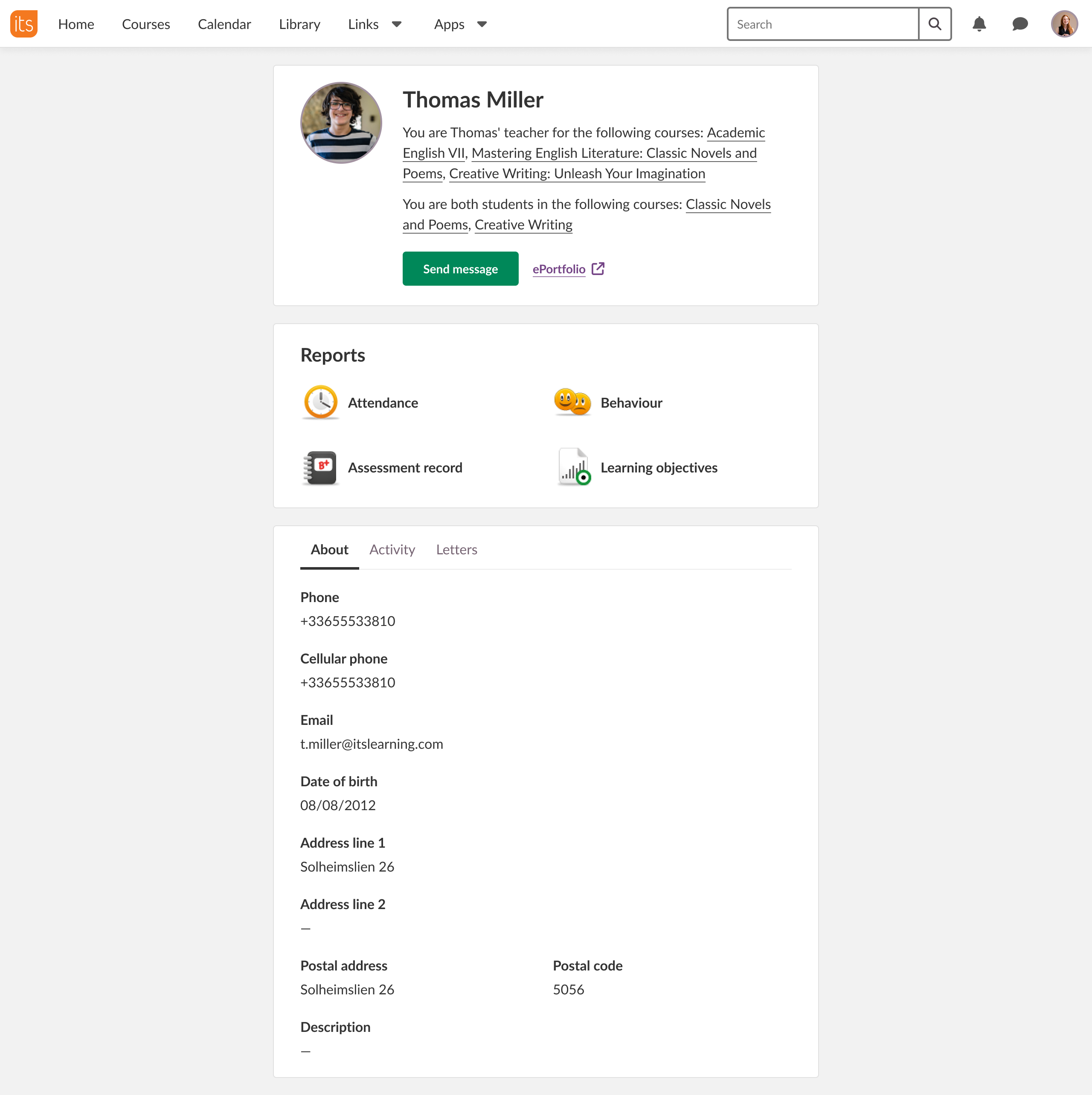
We have replaced the old profile card with a new, smaller card which also loads much faster. This simplified profile card only contains key information, and we are now building a new full page to replace the information found in the old card. We expect this work to stretch over the course of multiple releases, adding content in order of importance. We aim to replace all the information, and later modernise further.
The screenshot below gives you an idea of what the new page will look like when completed.
This first step includes the top section with basic information and the About section below with more detailed information if that's available and permitted for the current user to see.
| Area | Reference | Summary |
|---|---|---|
| LTI | ITS-90685 | Fixed an issue where the LTI 1.3 tool Clickview could not be opened in full screen. |
| ITS-90084 | Fixed an issue for SESAM LTI where apostrophes could cause a blank page to be shown. | |
| Task | ITS-88497 | Fixed an issue where tasks completed by a student would sometimes incorrectly appear in the teacher's follow-up tasks list. |