WHY ITSLEARNING
See why schools choose a European LMS designed for education over generic platforms.
See why schools choose a European LMS designed for education over generic platforms.
itslearning empowers teachers and helps all students reach their full potential.

Translation generated by an AI translation service
We're introducing a new course focus in itslearning: the Information Hub. It is designed for communication and resource sharing, giving schools a dedicated space to connect with students, teachers and parents.
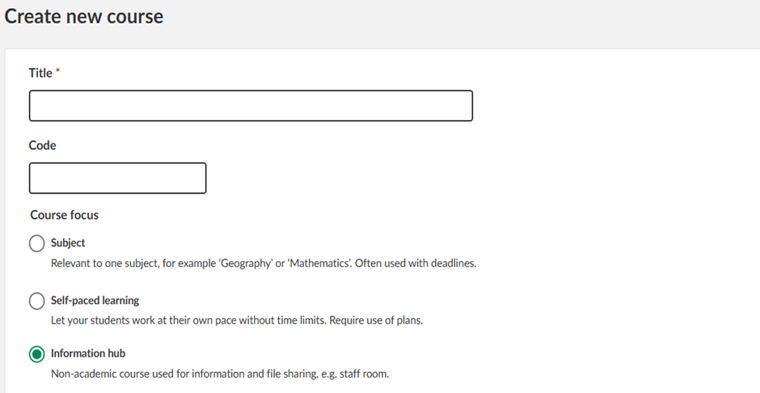
The Information Hub has one clear purpose: sharing information and resources.
Unlike academic courses, it removes elements such as plans, task lists and reports that are not relevant in non-teaching spaces. Instead, it offers a clean and focused environment for updates, documents and communication.
Replace long email threads and scattered files with a central space for policies, meeting notes, professional development resources and internal updates.
Create dedicated hubs for each class to share newsletters, events, permission forms and classroom updates. Parents can access relevant information without searching through their child's academic courses.
Use one central hub to share school-wide announcements, student handbooks, wellbeing resources or important messages.
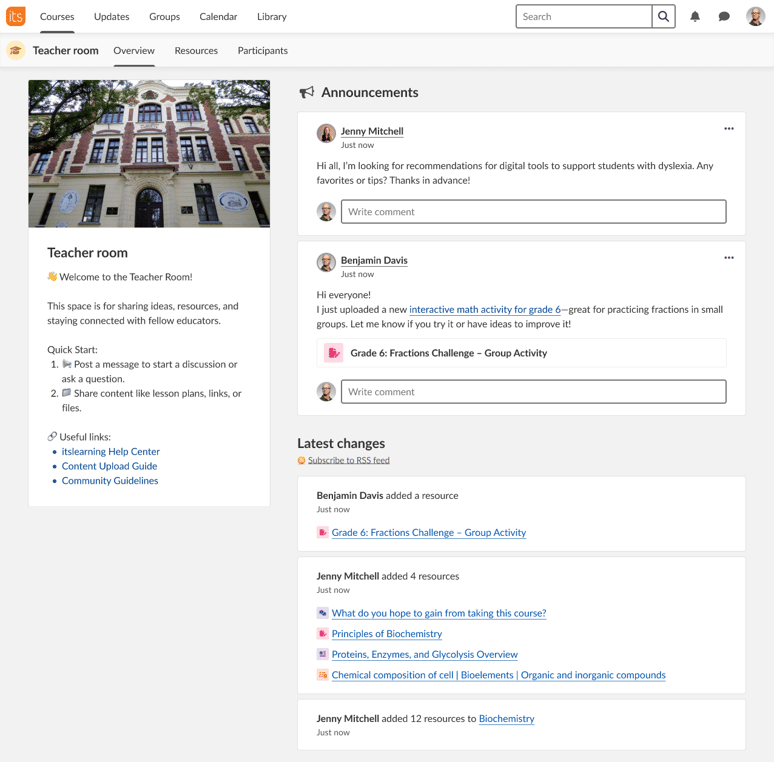
Teachers and administrators control access, content and structure. This makes it possible to set up communication spaces that match each school's needs, whether for staff, parents or students.
For schools using the Hierarchy Dashboard for broad communication, Information Hub provides a clearer and more purpose-built option. It helps organise content, manage access and reach the right audience more easily.
Information Hub will be available soon in itslearning. You create it the same way as any other course, but with a layout focused on sharing rather than teaching.
It supports everyday communication needs, from parent engagement to staff collaboration and school-wide updates.