
WHY ITSLEARNING
See why schools choose a European LMS designed for education over generic platforms.
See why schools choose a European LMS designed for education over generic platforms.
itslearning empowers teachers and helps all students reach their full potential.

Translation generated by an AI translation service
For many years, 'Note' has been a simple way for teachers to create and share content in their courses. As itslearning continues to develop, we are bringing more content creation features together in one flexible tool: Page.
As part of this change, we will gradually phase out the "Note" tool and encourage users to create new content using the "Page" tool. The transition will take place in stages between 1-14 November, 2026.
Our goal is to make content creation simpler by giving teachers one modern tool for creating and organising course content.
Rather than investing in multiple content creation tools, we're focusing our efforts on continuously improving Page to help teachers create engaging learning experiences more efficiently.
Page gives teachers more flexibility when creating course content, while making it easier to keep everything organised and easy for students to find.
With Page, you can:
Whether you are sharing instructions, creating learning materials or building a complete course module, Page gives you the flexibility to do it in one place.
And if you prefer the simple structure you are used to in Note, you can still use Page in the same way, with a simple text box to create and organise your content.
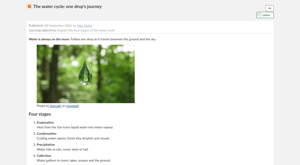
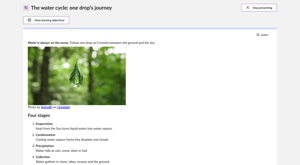
On the left: the content in the Note tool. On the right: how the content will look on the Page.
Your existing Note will remain available in the Page tool once the migration is completed, so you will continue to have access to the content you have already created. Each ‘Note’ will become a ‘Page’ containing one text and media block. Existing links to the ‘Note’ will open the migrated Page. The migration is designed to preserve the Note’s title, content, learning objectives, selected participants, visibility settings, and access.
Teachers will be able to use the Note tool until 31 October 2026, but we recommend creating new content with ‘Page’ now. After that, all existing Note content will be available in Page. There is nothing teachers need to do. All existing content will be migrated automatically, and we do not expect any changes to the way the content is formatted or displayed.
If you haven't explored Page yet, now is a good time to give it a try.
Start by creating new course content with Page and see how easy it is to:
For more information, read our Page support article.
Page is becoming the main tool for creating and sharing content in itslearning. By bringing more content creation features together, we want to make it easier for teachers to create and organise their courses, while giving students a more consistent learning experience.
We will continue to improve Page over the autumn, specifically features tied to the image gallery content block.
This feature is part of the German Development Project (GDP), a collaboration between four German states and itslearning aimed at enhancing digital education in Germany through tailored product developments. Learn more about the GDP roadmap and what other features you can expect to see. For German readers, more details on the German Development Project are made available on our webpages.