

WHY ITSLEARNING
See why schools choose a European LMS designed for education over generic platforms.
See why schools choose a European LMS designed for education over generic platforms.
itslearning empowers teachers and helps all students reach their full potential.

Translation generated by an AI translation service
We publish release notes a few days before each mid-week update. If you are reading this, the update will be available soon. Please note that release dates may change. Some features are also released gradually, which means not all users will see them at the same time. If a feature you expected is not yet available, it will appear soon.
| Area | Reference | Summary |
|---|---|---|
| Test 3.0 | TT-6140 |
Fixed an issue that caused an error after copying a test and opening the copy. |
We are pleased to announce an update to the personal Files area. It now features a modern design and improved accessibility, supporting more efficient workflows and a better user experience.
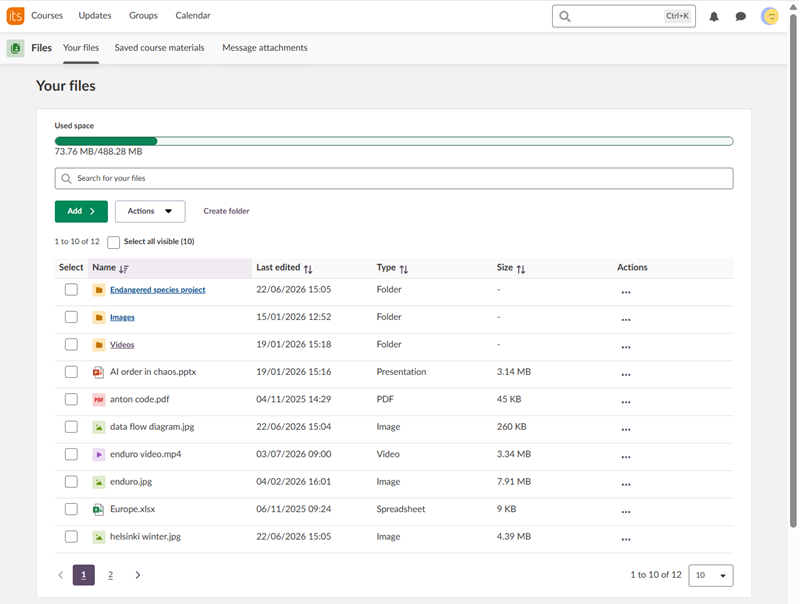
Your files provides users with a personal space to store, organise, create, and manage files in itslearning. Files can be reused across the platform through the file picker and remain private until shared.
In Your files, user can
Note: As adoption increases, storage usage may grow. School administrators should monitor storage consumption and adjust personal quotas in profile settings, if needed.
Saved course materials helps students retain access to work from past courses.
Students can access assignment submissions from courses that are no longer active or to which they no longer have access. Saved submissions include submitted text, uploaded files, assignment descriptions, and feedback.
The Message attachments tab provides an overview of files shared in active instant message conversations.
Users can view files they have shared, see the file type and date added, search within the list, and quickly navigate to the conversation where a file was shared.
More information: Files: Your Personal Area in itslearning
These features are part of the German Development Project (GDP), a collaboration between four German states and itslearning aimed at enhancing digital education in Germany through tailored product developments. Learn more about the GDP roadmap and what other features you can expect to see. For German readers, more details on the German Development Project are made available on our webpages.
Courses created using templates in IMS-ES and IMS-E now inherit course focus, consistent with current behavior elsewhere.
System administrators can now choose to hide the teachers in the internal course catalogue, by enabling or disabling the setting "Show names of teachers in the internal course catalogue" of the Features and security page.
.png?width=454&name=image-20260619-090745%20(958f1bc9-1000-4704-bb58-928077b5436e).png)
This will hide the course teacher(s) in the course card and on the details page of the course.
.png?width=226&name=image-20260619-090918%20(d98606c2-67ab-48ee-b7a8-159e0b687026).png)
The setting does not affect the course contact. These will still be shown on the details page of the course.
Together with this change, we have moved the information that you are already enrolled into a course with the action to go to that course inside this course card.
.png?width=250&name=image-20260702-124459%20(84aae694-a703-4230-a2b3-dbcc7e23cf09).png)
| Area | Reference | Summary |
|---|---|---|
| Test 3.0 | TT-6133 |
On smaller screens. The user may not have been able to see all question alternatives in the selection menu when setting up a test. |
| TT-5533 |
ReadSpeaker buttons added to test questions will display and function as expected when Test mode browser is active. |
| Area | Reference | Summary |
|---|---|---|
| Course Administration | ITS-105513 |
Course start page setting now displays correctly in older courses |















.png?width=754&name=Screenshot%202026-02-16%20at%2013.05.01%20(7eda78ed-190b-4950-9fbc-49c0a8b7c5b8).png)